
Philhealth Members guide for 2026
PhilHealth Member Portal: Complete Guide to Login, Registration & Online Services (2026)
Explore what PhilHealth member portal is, how to register, how to use the Member Portal, how much to contribute, how to pay, how YAKAP works, and what to do when you need benefits or make a claim.
Requirements for philhealth online registration
Here are requirements for Philhealth member portal registration:
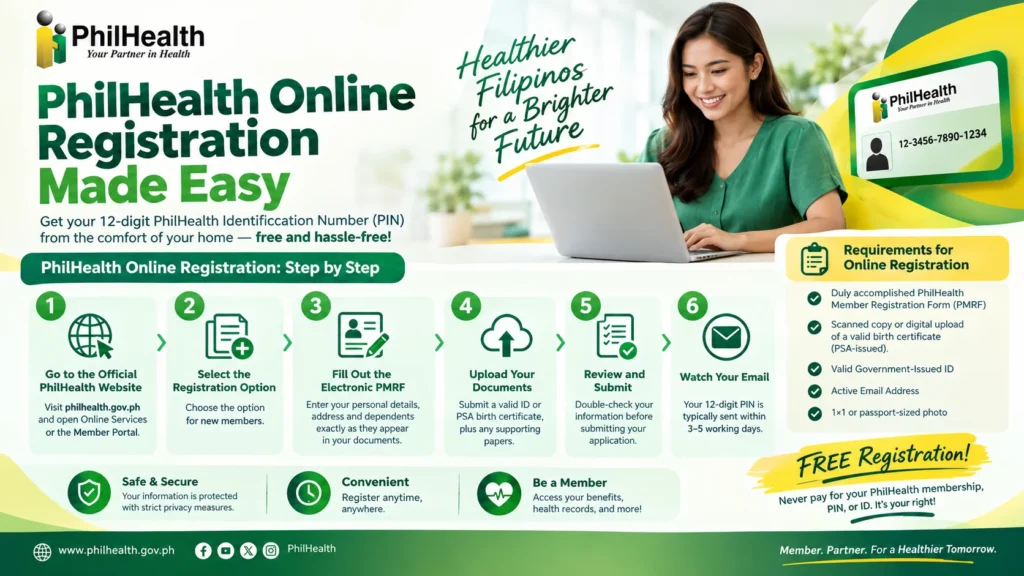
PhilHealth online registration: step by step (2026)
Registering for PhilHealth is free, and you can start online. Once your registration is processed, you receive your 12-digit PhilHealth Identification Number (PIN), which you need for the member portal, YAKAP, hospital claims and most other PhilHealth services.
Never pay for registration. PhilHealth does not authorize anyone to charge a fee for membership, your PIN, or your ID.
- Go to the official PhilHealth website at philhealth.gov.ph and open Online Services or the Member Portal.
- Select the registration option for new members.
- Fill out the electronic PMRF. Enter your personal details, address and dependents exactly as they appear on your documents.
- Upload your documents (valid ID or PSA birth certificate, plus any supporting papers).
- Review and submit your application.
- Watch your email. Your PIN is typically sent within 3-5 working days.

After you get your PIN
PhilHealth Login: How to Access Your Account
The PhilHealth portal lets you view your records, check posted contributions, download your MDR and use other online services at any hour. Here is how to get in.
First-time account creation
You need an account before you can log in for the first time.
Logging in to an existing account
Open the official portal, enter your login details and sign in.
Forgot your password or PIN?

Your safety matters. This website never asks for your PIN, username or password, and we cannot log in on your behalf. If any site, message or caller asks you to share your login details, do not respond.
PhilHealth Contribution 2026
PhilHealth contributions fund your health coverage. The rate is a percentage of your monthly income, and for 2026 it has not changed from the year before.
Formula: Monthly income × 5% = monthly premium (income below ₱10,000 is computed at ₱10,000, and income above ₱100,000 at ₱100,000).
Enter your monthly income below to see your premium.
PhilHealth contribution calculator (2026)
Based on the 5% rate with a ₱10,000 income floor and ₱100,000 ceiling. Estimate only. Confirm your exact amount with PhilHealth or your SPA.
How to Pay PhilHealth Contributions?
You can pay your PhilHealth contributions online using the PhilHealth Member Portal or mobile wallet apps like GCash.
What is Philhealth Members Portal?
The PhilHealth Member Portal is an online digital platform created by the Philippine Health Insurance Corporation (PhilHealth). It gives registered members a secure, convenient way to check and manage their health insurance information online without visiting a physical office.
The key features and services include:
Read Also: PhilHealth online Appointment
Philhealth Benefits
PhilHealth provides health insurance coverage for all Filipinos through fixed case rates deducted directly from hospital or clinic bills before discharge.
Philhealth ID Issues and How to Fix Them
The table below breaks down the most common PhilHealth ID issues and the fastest ways to fix them:
Common Issue | What Causes It | How to Fix It |
|---|---|---|
“Member Information does not exist” Error | Occurs when trying to register or log into the PhilHealth Member Portal, usually due to an unverified record or an incorrect PIN. | Double-check your PIN. If it still fails, you must submit an updated PhilHealth Member Registration Form (PMRF) via email or at a local office to link your data. |
“No PhilHealth Number Found” on eGovPH | The eGovPH Super App cannot pull your digital ID because your records are unverified, outdated, or system sync errors are occurring. | Open the app, go to the “NGAs” tab, select “ePhilHealth,” and accept the Single Sign-On agreement to manually link your profile. If it still fails, visit a local branch to update your status. |
Online Form Submission Failures | The official PhilHealth Electronic Registration System frequently drops attachments or throws errors when uploading IDs. | Ensure your scanned files are small and clear. If it repeatedly crashes, bypass the site entirely by printing the PMRF, filling it out, and dropping it off at a physical branch. |
Expired Activation Link | The confirmation email link sent to activate your online portal account expires after a short window of time. | Navigate back to the portal and request a new activation email. If the system blocks you, a branch officer can manually activate your portal access. |
Mismatched Records / Typos | Minor name spellings or birthdate typos on your initial form mismatch your PSA Birth Certificate, risking denied hospital claims later. | Tick the “Updating/Amendment” box on a fresh PMRF. Submit it along with your PSA Birth Certificate to a local branch to overwrite the mistake. |
Lost or Damaged Physical ID | Your physical paper or PVC ID card is missing or ruined. | You cannot request a replacement online. Visit your nearest Local Health Insurance Office (LHIO), present a valid ID, and fill out a new PMRF to print a replacement. |
FAQs
Is philhealthportal.com the official PhilHealth site?
No. The official Member Portal is at memberinquiry.philhealth.gov.ph and the main site is philhealth.gov.ph. Similarly named .com sites are private and not affiliated with PhilHealth.
How long does PhilHealth online registration take?
Complete online applications are processed within 3–5 working days, and your PIN is emailed to you once approved.
Can I register twice, or reuse one email for two people?
No. One email address can be used for one registration only, and you may not submit more than one application — duplicates are disregarded.
I forgot my PhilHealth PIN. What do I do?
A forgotten PIN can’t be recovered through the portal’s password reset. Contact the PhilHealth Action Center or visit the nearest LHIO with a valid ID.
I forgot my Member Portal password. What do I do?
Use the password-reset option on the portal login page — the reset link goes to your registered email address.
Can I get my PhilHealth ID card online?
The online process issues your PIN. For the physical ID card, confirm current issuance procedures with PhilHealth or your nearest LHIO, as they vary.
Is it safe to log in to the Member Portal?
Yes — on the official site. Always check the address bar shows memberinquiry.philhealth.gov.ph with HTTPS before entering your PIN or password.
Why isn’t my latest contribution showing?
Posting takes time: e-wallet/bank payments post within days, while employer batch remittances commonly take 2–4 weeks to appear. Check with HR first.
Do I need to pay before I can use PhilHealth benefits?
Contributions must be posted for availment. If paying voluntarily via e-wallet, generate your SPA in the portal first — payments without it won’t go through.
What is YAKAP?
YAKAP is PhilHealth’s primary-care program. Members select their YAKAP clinic inside the Member Portal.
Can OFWs register for PhilHealth online?
Yes — through the online registration page or the email route if the portal is unreachable from abroad.
Who do I contact for help?
PhilHealth hotline (02) 8441-7442, or email the Action Center at actioncenter@philhealth.gov.ph. This guide is unofficial — for account-specific issues, always go through official channels.

by Andrew Mondon
Last Updated: October, 2026