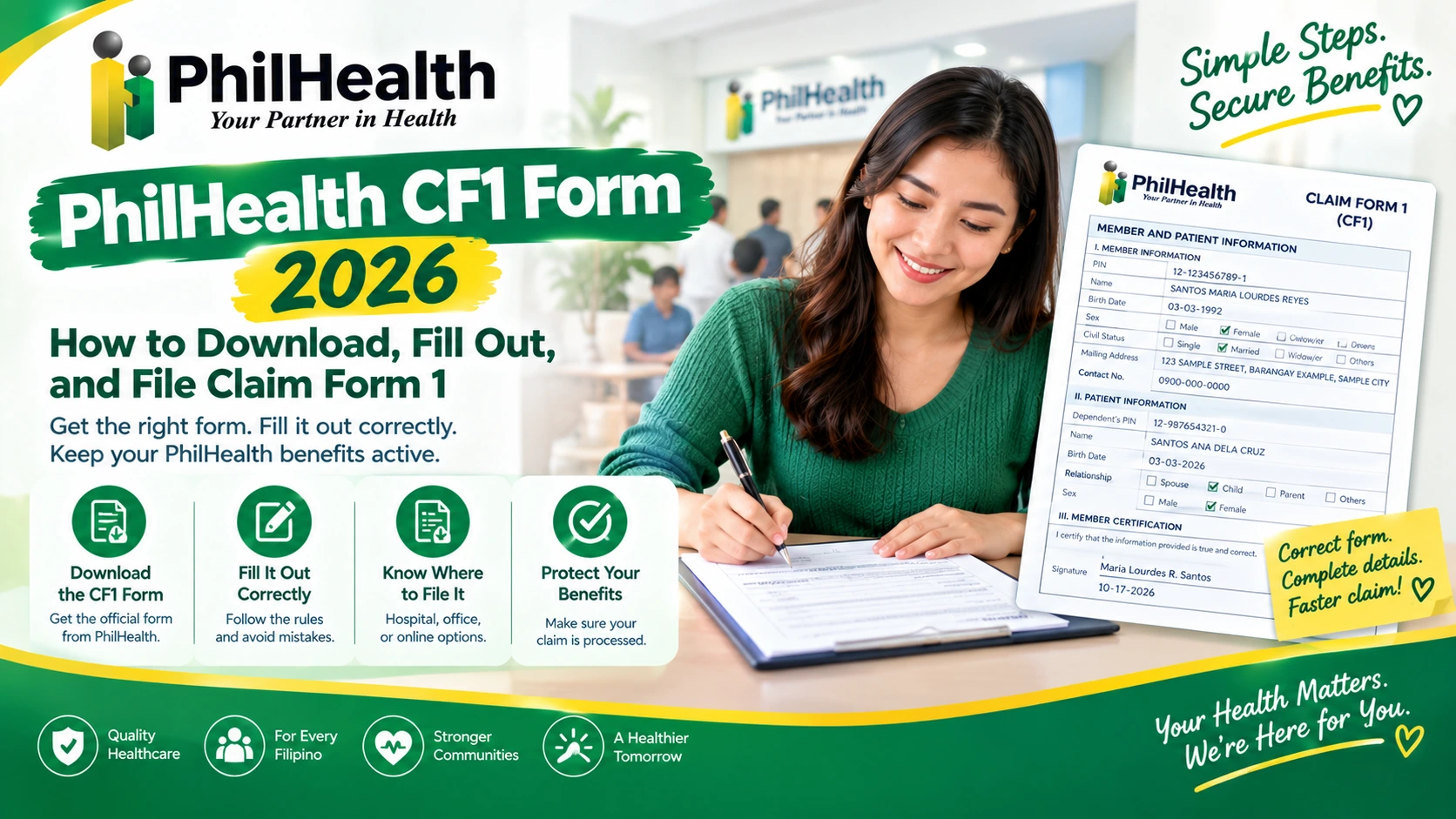
PhilHealth CF1 Form 2026: How to Download, Fill Out, and File Claim Form 1
You are tired. Someone you love is in a hospital bed, or you are holding a newborn. A nurse hands you a stack of papers and says, “Please fill out CF1 before discharge.” You look at the form. It has five parts and a lot of boxes. And a worry creeps in: could one wrong box cost us our PhilHealth benefit?
It is a fair worry. PhilHealth itself says claim forms with incomplete information will not be processed.
In this guide, you will learn how to download and fill out the PhilHealth CF1 Form, follow formatting rules, avoid common mistakes, and see sample forms for members and dependents as patients.
What Is the PhilHealth CF1 Form?
The PhilHealth CF1 form stands for Claim Form 1. It is the part of your claim that says who the member is and who the patient is. Think of it as your introduction to the claim.
The hospital fills out the other half. Its forms tell PhilHealth what treatment you received. Together, they let PhilHealth pay the benefit.
The 5 Parts of the PhilHealth CF1 Form
The PhilHealth CF1 form has five parts. You will not fill in all of them.
Part | What It Is | Who Fills It Out | Skip It When |
|---|---|---|---|
Part I | Member information: PIN, name, birth date, mailing address, sex, and contact details | You | Never skip it |
Part II | Patient information: the dependent’s PIN, name, birth date, relationship, and sex | You | The patient is the member |
Part III | Member certification: a signature, plus a representative’s relationship and reason if needed | You, or your representative | Never skip it |
Part IV | Employer’s certification: PEN, business name, contact number, and a certification | Your employer | You are not employed |
Part V | For PhilHealth use only | PhilHealth | Always skip it |
Who Files the Claim
Many people think they must file a PhilHealth claim themselves. Usually, they do not. At a PhilHealth-accredited hospital, the hospital files the claim for you. The benefit is then deducted from your bill at discharge.
So what is your job? Give correct information and sign forms like the PhilHealth CF1 form. Here are the two filing paths.
Path | When It Applies | Who Files | What You Do |
|---|---|---|---|
Hospital files (direct filing) | You are admitted to a PhilHealth-accredited hospital | The hospital, through PhilHealth’s electronic claims system | Give your PIN and a valid ID at admission. Fill out and sign the PhilHealth CF1 form. Sign the other forms at discharge |
You file directly (reimbursement) | Limited cases, such as confinement abroad or an emergency at a non-accredited facility | You, at a PhilHealth Regional Office or Local Health Insurance Office (LHIO) | Submit the PhilHealth CF1 form, CF2, and supporting documents within 60 days, or 180 days abroad |
Where to Download the PhilHealth CF1 Form PDF
PhilHealth publishes the PhilHealth CF1 form for free. You can also pick up a copy at the hospital’s admitting desk. Here is how to download it.
- Go to philhealth.gov.ph and open Downloads.
- Find the Claims section.
- Choose Claim Form 1: Member and Patient Information.
- Print it.
Formatting Rules For PhilHealth CF1 Form
PhilHealth has simple rules for the PhilHealth CF1 form. They take two minutes to learn. They can save you a returned claim.
Rule | What PhilHealth Says | Example |
|---|---|---|
Letters | Write in capital letters | JUAN |
Pen | Use a ballpen or sign pen only | No pencil |
Names | Write the last name first, then the first name, name extension, and middle name | DELA CRUZ JUAN JR SIPAG |
Dates | Write the month, day, and year | 01/01/1990 |
PIN and PEN | Use the 2-9-1 format | 12-123456789-1 |
Mailing address | Write where PhilHealth should send the Benefit Payment Notice | An address where you get mail |
Boxes | Tick the right boxes | Tick only what applies |
How to Fill Out Part I and Part II of the CF1 Form
Let’s fill in the first two parts of the PhilHealth CF1 form together. We will use a made-up member named Maria Lourdes Reyes Santos. Her baby, Ana, is the patient.
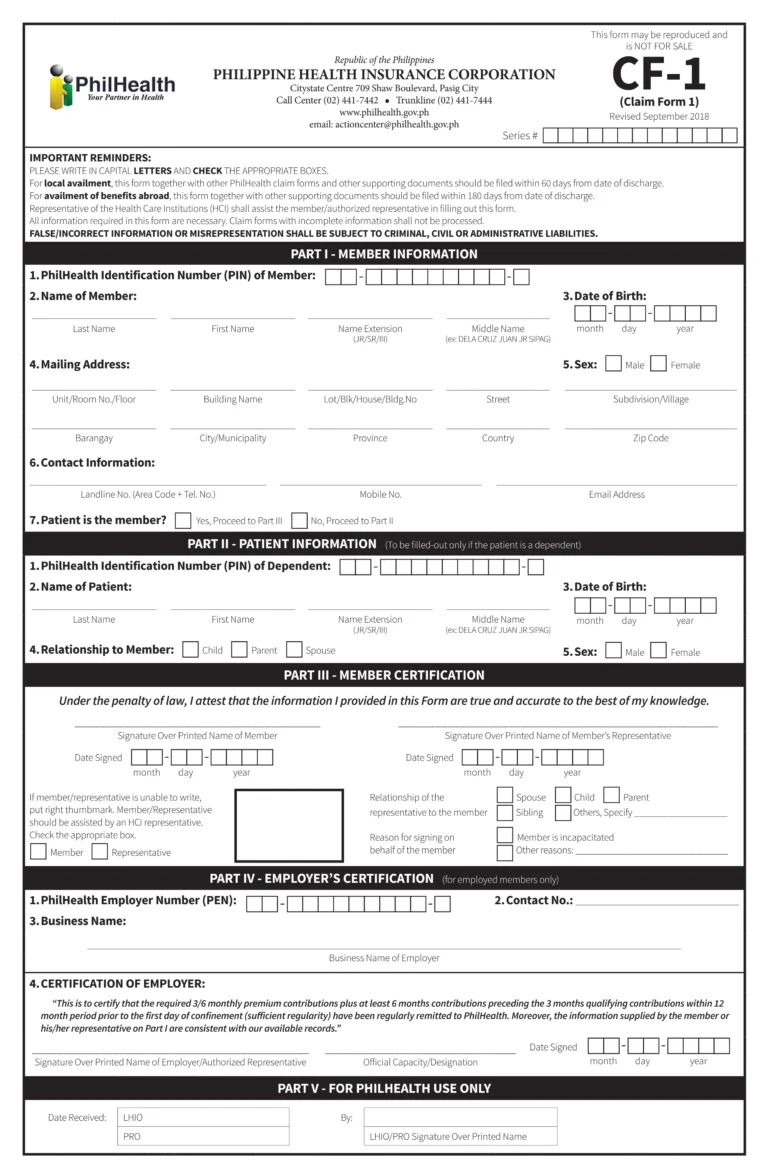
Step 1: Check Your MDR Before the PhilHealth CF1 Form
Before you write, open your MDR. Copy the details exactly. Your name, PIN, and dependents must match. Visit the PhilHealth MDR form.
Pro Tip: PhilHealth’s guidelines say a dependent patient’s name should appear on the member’s MDR. If it does not, attach proof of the relationship.
Step 2: Write Your PIN
Write your PIN in the 2-9-1 format, like 12-123456789-1.
Step 3: Write Your Name
Start with the last name. Then the first name, the name extension (like JR), and the middle name.
Pro Tip: If your name is different from your MDR, attach a birth or marriage certificate so the MDR can be updated.
Step 4: Write Your Date of Birth
Write the month, day, and year.
Step 5: Write Your Mailing Address
Write an address where you receive mail. PhilHealth sends the Benefit Payment Notice there.
Step 6: Write Your Contact Details
Add a phone number or email you check often.
Step 7: Answer “Is the Patient the Member?”
This is the fork we talked about.
- Yes: The member is the patient. Skip Part II.
- No: A dependent is the patient. Fill in Part II.
Part II of the PhilHealth CF1 Form
Ana is the patient, so Maria fills in Part II. She writes the dependent’s details.
Field | What to Write | Maria’s Entry |
|---|---|---|
Dependent’s PIN | The dependent’s PIN, in the 2-9-1 format | 12-987654321-0 |
Name | Last name first | SANTOS ANA REYES |
Date of birth | Month, day, and year | 03/15/2026 |
Relationship to the member | Child, parent, or spouse | Child |
Sex | As on the record | Female |
Part III of the PhilHealth CF1 Form
Part III is the heart of the PhilHealth CF1 form. It is where someone promises the information is true. The wording on the form is serious: “Under the penalty of law, I attest that the information I provided in this Form is true and accurate to the best of my knowledge.”
Who Can Sign Part III of the PhilHealth CF1 Form
Usually, the member signs. But the form also allows a representative. Here is how to decide.
Your Situation | Who Signs | What to Tick |
|---|---|---|
You can sign | You, the member | Sign over your printed name. Leave the representative line empty |
You are incapacitated | Your representative | Tick “Representative,” the relationship, and “Member is incapacitated” |
You cannot be there for another reason, such as being abroad | Your representative | Tick “Representative,” the relationship, and write the reason under “Other reasons” |
You cannot write | You, with a thumbmark | Put your right thumbmark. A hospital representative must assist you |
The Relationship Boxes on the PhilHealth CF1 Form
If a representative signs, they tick how they are related to the member:
The Rules for Representatives Signing the PhilHealth CF1 Form
Rule | What It Says |
|---|---|
Age | A child who signs as a representative must be 18 or older |
Minor members | If the member is a minor, the legal guardian countersigns |
Guardians | If the guardian is not on the MDR, a judicial order must be attached |
Part IV of the PhilHealth CF1 Form
Part IV of the PhilHealth CF1 form is only for employed members. If you are self-paying, skip it. You do not fill it in yourself. Your employer does.
What Goes in Part IV of the PhilHealth CF1 Form
Field | What It Is | Who Writes It |
|---|---|---|
PEN | Your employer’s PhilHealth Employer Number | Your employer |
Contact number | How to reach the employer | Your employer |
Business name | The employer’s business name | Your employer |
Certification | A statement about your contributions | Your employer signs it |
Signature, designation, and date | The authorized person’s signature, job title, and date signed | Your employer |
How to Get Part IV of the PhilHealth CF1 Form Done Fast
- Fill Part I first. HR needs it to check your details.
- Ask HR early. Do not wait for discharge day.
- Give HR a clean copy. Handwriting should be readable.
- Ask what HR needs. Some offices have their own steps.
Pro Tip: Never fill Part IV yourself. Never sign for your employer.
PhilHealth CF1 From Deadlines
Time matters with a claim and a PhilHealth CF1 form. The PhilHealth CF1 form itself says to file within 60 days of discharge for claims in the Philippines. For benefits abroad, it says 180 days. Miss the window, and your claim may be denied.
8 Mistakes That Get a PhilHealth CF1 Form Returned
Most returned claims fail because of simple mistakes on the PhilHealth CF1 form. Here are eight common ones.
Mistakes | Why It Causes Trouble | Fix |
|---|---|---|
1. Blank required items | PhilHealth says claim forms with incomplete information will not be processed | Check every item. Ask the hospital representative to review it |
2. Wrong PIN format | PINs and PENs should use the 2-9-1 format | Copy your PIN from your MDR |
3. Missing signature or date | Part III is not complete | Sign and date it |
4. Wrong relationship box or reason | PhilHealth cannot tell who signed or why | Tick the representative, relationship, and reason boxes |
5. No employer’s certification | Employed members need Part IV | Ask HR early |
6. A name that does not match the MDR | PhilHealth cannot match your records | Update your MDR. Attach a birth or marriage certificate |
7. Filing late | The 60-day or 180-day window closed | File within days of discharge |
8. An outdated form version | Older layouts have different parts | Use “CF-1, Revised September 2018” from philhealth.gov.ph |
If Your CF1 Form Claim Is Returned or Denied
A returned or denied PhilHealth CF1 form claim is not the end. You have options. But the deadlines are short.
Step by Step After a Returned PhilHealth CF1 Form Claim
- Ask for the written notice. Ask for the reasons in writing. Note the date you received it. Your deadline usually runs from that date.
- Find the reason. Common reasons are incomplete documents, late filing, or a record problem.
- Fix what you can. If the hospital filed the claim, ask it to correct your PhilHealth CF1 form and resubmit.
- File a motion for reconsideration. This is a written, signed request to the PhilHealth Regional Office that denied or reduced the claim. Attach new proof.
- File a final appeal if needed. If the motion is denied, you can appeal to PhilHealth’s Protests and Appeals Review Department.
Step | Where | Usual Deadline |
|---|---|---|
Motion for reconsideration | The PhilHealth Regional Office that denied the claim | 15 calendar days from receipt of the written notice |
Final appeal | PhilHealth’s Protests and Appeals Review Department | 15 calendar days from receipt of the denial of the motion |
Sample Filled-Out PhilHealth CF1 Form
Everything in them is made up, including the names, numbers, and company. Use them to see how a finished PhilHealth CF1 form looks.
CF1 Form Where the Member Is the Patient (Employed)
Pedro Santos is employed. He is also the patient.
Part | Field | Pedro’s Entry (Fictional) |
|---|---|---|
Part I | PIN | 12-555555555-5 |
Part I | Name | SANTOS PEDRO GARCIA |
Part I | Date of birth | 05/20/1990 |
Part I | Mailing address | 45 SAMPLE ROAD, BARANGAY EXAMPLE, SAMPLE CITY |
Part I | Contact | 0900-111-2222 |
Part I | Is the patient the member? | Yes. Go to Part III |
Part II | All fields | Skipped. The patient is the member |
Part III | Signature | Pedro signs over his printed name, with the date |
Part IV | PEN | 12-345678901-2 |
Part IV | Business name | SAMPLE COMPANY INC. |
Part IV | Certification | Signed by the HR officer, with a designation and date |
Part V | For PhilHealth use | Left blank |
CF1 Form Where a Dependent Is the Patient (Self-Paying)
Maria Santos is self-paying. Her baby, Ana, is the patient. Part I and Part II match what we filled in earlier.
Part | Field | Maria’s Entry (Fictional) |
|---|---|---|
Part I | Name | SANTOS MARIA LOURDES REYES |
Part I | Is the patient the member? | No. Go to Part II |
Part II | Name | SANTOS ANA REYES |
Part II | Relationship | Child |
Part III | Signature | Maria signs over her printed name, with the date |
Part IV | All fields | Skipped. Maria is not employed |
Part V | For PhilHealth use | Left blank |
A Privacy Reminder for Your PhilHealth CF1 Form
Never post a photo of your own PhilHealth CF1 form online. It shows your PIN, birth date, and address. If you must share one, cover those details first.
FAQs
What is the PhilHealth CF1 form?
The PhilHealth CF1 form is Claim Form 1. It gives PhilHealth the member and patient information for a claim. It has five parts, and you fill in only the parts that apply to you.
Is the PhilHealth CF1 form free?
Yes, the form itself says it may be reproduced and is not for sale. Do not pay anyone for it.
Who fills out Part IV of the PhilHealth CF1 form?
Your employer fills out Part IV, the employer’s certification. It is only for employed members. Ask your HR early, and never fill it in or sign for your employer.
Does self-paying mean I skip the employer’s certification?
Yes, Part IV is only for employed members, so self-paying members skip it. Ask the hospital’s PhilHealth desk if it needs anything else for your claim.
Can someone sign my PhilHealth CF1 form for me?
Yes, a representative can sign Part III. They tick the relationship and the reason, such as the member being incapacitated. If the member cannot write, they use a right thumbmark with a hospital representative’s help. Ask the hospital if it also needs an authorization letter.
How many days do I have to file a PhilHealth claim?
File within 60 days of discharge for claims in the Philippines, or within 180 days for benefits abroad. The hospital files most claims for you, so ask it to confirm when it filed.
What happens if my PhilHealth CF1 form is incomplete?
PhilHealth says claim forms with incomplete information will not be processed. Check every item, sign and date Part III, and ask the hospital representative to review the form before you submit it.
Can I fill out or file the PhilHealth CF1 form online?
We found no PhilHealth online route for members to file a claim. Hospitals file through PhilHealth’s electronic claims system. Download the form from PhilHealth, and fill it in by hand with a ballpen or sign pen.