PhilHealth MDR Form 2026: How to Get & Download
You are at the hospital counter. The billing officer looks up and says, “Ma’am, we need your MDR.” You have no idea what that is. So you grab your phone and search for a PhilHealth MDR form PDF download.
What you find is a mess. Blank forms. Sample files. Sites asking for fees. Which PhilHealth MDR form is real? Which one is safe? Here is your answer, there is no blank PhilHealth MDR form to download. PhilHealth creates your MDR for you. It is free. And you can print it from the Member Portal.
In this guide, you will find the PhilHealth MDR form PDF the right way. Learn how to download your Member Data Record, read a sample, and fix mistakes with a PMRF in 2026 for free.
What Is the PhilHealth MDR Form?
MDR stands for Member Data Record. Think of the PhilHealth MDR form as your profile on paper. It shows who you are and who is covered under your membership.
You do not fill in an MDR. PhilHealth creates it after your registration is processed. No PIN means no MDR.
What Shows Up on a PhilHealth MDR Form
Open your PhilHealth MDR form, and you will see these details.
What You See | What It Shows |
|---|---|
PhilHealth Identification Number (PIN) | Your 12-digit membership number |
Name, birth date, sex, and civil status | Who you are, as PhilHealth has it on file |
Address and contact details | Where PhilHealth can reach you |
Membership category | Whether you are employed, self-earning, sponsored, or another type |
Employer | The company you work for, if you are employed |
Declared dependents | The family members covered under your membership |
Why Hospitals, Employers, and Schools Ask for a PhilHealth MDR Form
People are asked for a PhilHealth MDR form more often than they expect. Common reasons include:
How to Download Your PhilHealth MDR Form Online
You do not need to queue for your PhilHealth MDR form. You only need your PIN and a Member Portal account. Follow these five steps.
Step 1: Open the Official Member Portal
Go to memberinquiry.philhealth.gov.ph/member. Check the address bar. It must end in .gov.ph.
Step 2: Log In
Enter your PIN and your password. If the page shows a CAPTCHA, complete it. Then click Log In.
Pro Tip: Type your 12-digit PIN without spaces or dashes if the page asks for it that way.
Step 3: Find “Print MDR”
Look at your dashboard. You should see a Print MDR button. Some guides call it “MDR Printing” with a printer icon.
Pro Tip: Labels can change. If you cannot find it, look for the MDR or printer icon near your member information.
Step 4: Save or Print the PDF
Your PhilHealth MDR form opens as a PDF. Save it to your phone. Print it if you need paper.
Step 5: Read Every Line
Do not just print your PhilHealth MDR form and run. Read the whole page. Compare it with your valid ID.
No Account Yet?
You need a Member Portal account to print your PhilHealth MDR form. Creating one is free. PhilHealth’s account page asks for these details:
Field | What to Enter |
|---|---|
PIN | Your 12-digit number |
Name | Last name and first name. Tick the mononym box if you have only one name |
Date of birth and sex | As shown in your records |
Email and mobile number | One you use every day |
Password | 8 to 32 characters, with a number, an uppercase letter, a lowercase letter, and a special character |
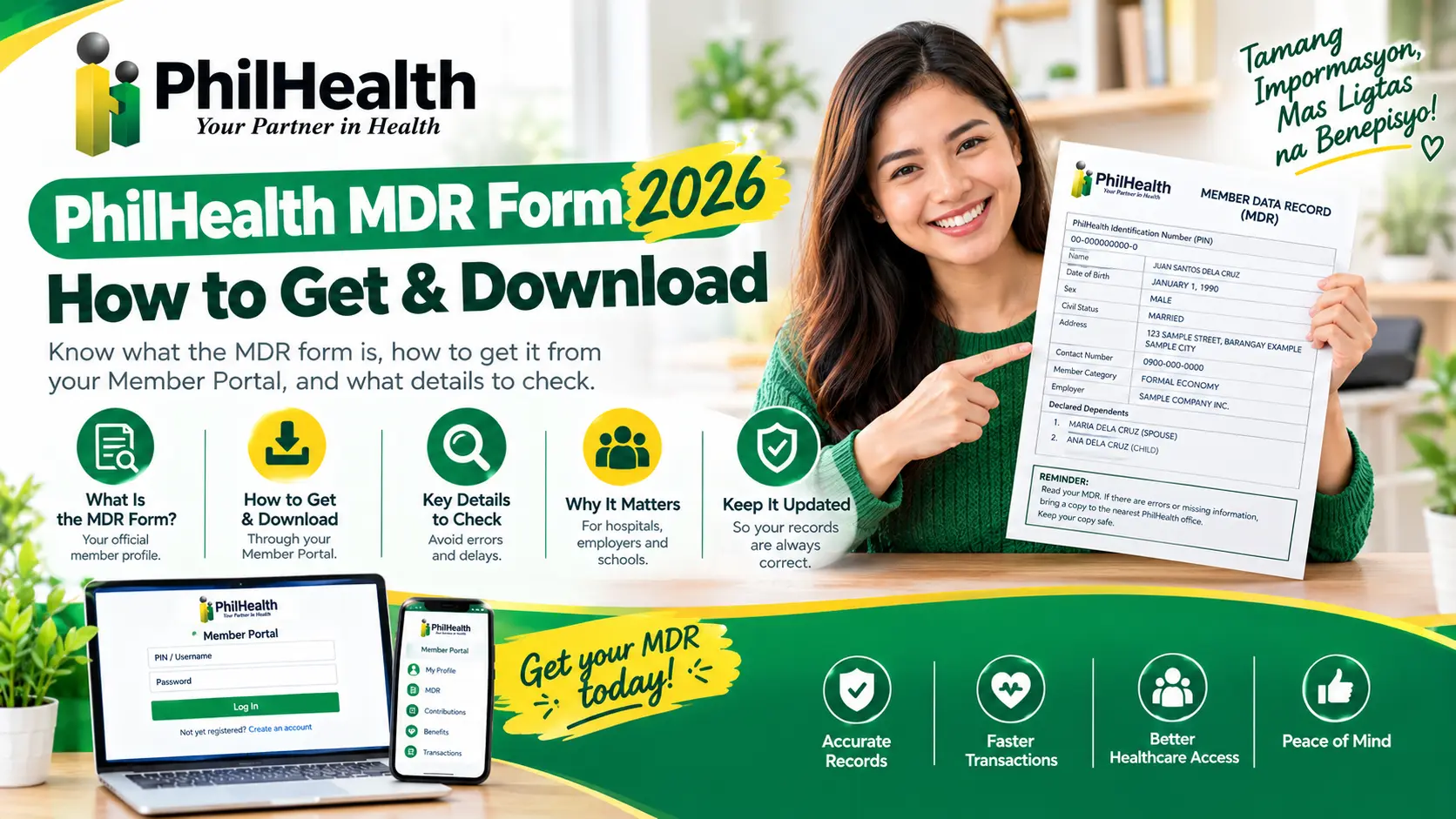
MDR PhilHealth Form Sample
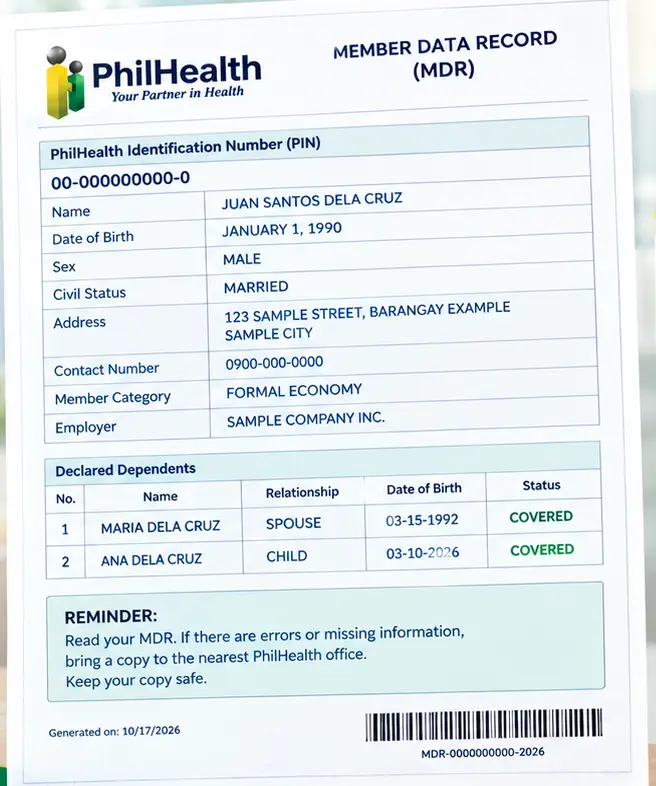
Line | Sample Entry | What It Means |
|---|---|---|
Title | MEMBER DATA RECORD | PhilHealth’s name for the document |
PIN | 00-000000000-0 | Your 12-digit membership number |
Member category | FORMAL ECONOMY | Usually an employed member. “Informal economy” usually means self-employed |
Name | JUAN SANTOS DELA CRUZ | Must match your valid ID |
Birth date and sex | JANUARY 1, 1990, MALE | Check both carefully |
Civil status | MARRIED | Must match your documents |
Address | 123 SAMPLE STREET, BARANGAY EXAMPLE, SAMPLE CITY | Where PhilHealth can reach you |
Contact number | 0900-000-0000 | Keep it current |
Employer | SAMPLE COMPANY INC. | Shown if you are employed |
Dependents | 1. MARIA DELA CRUZ (SPOUSE) 2. ANA DELA CRUZ (CHILD) | The family members covered under your membership |
The Reminder at the Bottom of a PhilHealth MDR Form
A real PhilHealth MDR form ends with a short reminder in English and Filipino. In plain words, it says three things:
In Filipino: “Basahin ang inyong MDR. Kung may mali o kulang, dalhin ito sa pinakamalapit na PhilHealth office. Ingatan ang inyong kopya.”
Visit Also: PhilHealth CF1 Form
Spot the Errors in PhilHealth MDR Form
Meet Maria. These are her documents:
Now look at Maria’s PhilHealth MDR form. It is fictional too.
Line | What Maria’s MDR Says |
|---|---|
Name | MARIA LOURDES RAYES SANTOS |
Birth date | MARCH 3, 1992 |
Civil status | SINGLE |
Dependents | NONE |
The 5-Minute Check for Your Own PhilHealth MDR Form
Check This | Why It Matters | If It Is Wrong |
|---|---|---|
Name spelling | It must match your valid ID | Update it with a PMRF |
Birth date and sex | Wrong details can block a claim | Update it with a PMRF |
Civil status | It must match your documents | Update it with a PMRF and your certificate |
Address and contact number | PhilHealth needs to reach you | Update it with a PMRF |
Membership category | It affects how you pay | Ask your PhilHealth office |
Employer | It should show your current employer | Ask HR, or update with a PMRF |
Dependents | Only listed family members are covered | Add them with a PMRF and proof of relationship |
Fixing Mistakes
You cannot edit the PDF of your PhilHealth MDR form. You change the record itself. PhilHealth updates your PhilHealth MDR form through the PMRF. The PMRF has a section just for updates. Tick the box for Updating/Amendment, and PhilHealth will treat the form as an update.
What You Can Update on Your PhilHealth MDR Form With the PMRF
What You Want to Change on Your PhilHealth MDR Form | Where It Goes on the PMRF | Papers to Bring |
|---|---|---|
Name (a misspelling, or a change after marriage) | Change/Correction of Name, with a FROM and a TO | Valid ID, your PSA birth certificate, and a PSA marriage certificate if marriage is the reason |
Date of birth | Correction of Date of Birth | PSA birth certificate |
Sex | Correction of Sex | PSA birth certificate |
Civil status | Change of Civil Status | The matching certificate, such as a PSA marriage certificate |
Address, phone, mobile, or email | Updating of Personal Information, Address, Telephone, Mobile Number, or E-mail Address | Valid ID, and proof of address if asked |
Dependents | Declaration of Dependents | Proof of relationship, such as a marriage or birth certificate |
Who Counts as a Dependent on Your PhilHealth MDR Form?
Dependent | What the PMRF Says |
|---|---|
Spouse | The living spouse |
Children | Children below 21 years old |
Parents | Parents who are 60 years old and above and totally dependent on the member |
Dependents with disability | Registered as principal members, under the law on mandatory PhilHealth coverage for persons with disability |
Maria’s Fix for Her PhilHealth MDR Form
Remember Maria from the last section? Her PhilHealth MDR form had three errors. Here is her fix:
- Tick Updating/Amendment on her PMRF.
- Change/Correction of Name: FROM RAYES TO REYES.
- Change of Civil Status: FROM SINGLE TO MARRIED.
- Declaration of Dependents: add Pedro Santos (spouse) and Ana Santos (child).
- Attach her PSA marriage certificate and Ana’s PSA birth certificate.
How to Submit Your PhilHealth MDR Form Update
- Download the PMRF. It is free. The form itself says it is not for sale.
- Tick Updating/Amendment. PhilHealth’s own steps say to tick “for updating” on the form.
- Fill it out. Use capital letters. Sign over your printed name, or use your right thumbmark if you cannot write.
- Attach your proof. Bring clear copies.
- Submit it. See the options below.
- Wait for the updated record. PhilHealth’s steps say to await the printout of your updated PhilHealth MDR form.
Way to Submit | What to Know | Status |
|---|---|---|
In person at the nearest PhilHealth office | The official steps say to submit the properly filled-out PMRF to the nearest PhilHealth office | Confirmed by PhilHealth |
By email to actioncenter@philhealth.gov.ph | Guides say members outside Metro Manila and OFWs often send clear scanned copies | From guides. Confirm with your office |
Through the Member Portal | PhilHealth said in April 2026 that update requests can now be submitted online through the portal | Reported by PhilHealth. Check what your portal shows |
With help from HR | Employed members can ask HR to help route the update | From guides. Still check your updated MDR |
Common PhilHealth MDR Form Problems and Fixes
Problem | What to Do With Your PhilHealth MDR Form |
|---|---|
I cannot log in | Check that your PIN has 12 digits. Then reset your password with your PIN and registered email |
I forgot my password | Use the reset page. If you lost access to that email, visit a PhilHealth office |
I cannot find Print MDR | Look for an MDR or printer icon near your member information. The label can change. Try another browser or device |
My PhilHealth MDR form still shows old data after I updated | Processing takes time. Ask the office for the status. Bring your PMRF copy and the office name or reference number |
The PDF will not open | Update your PDF reader, download the file again, or try your phone |
My name is misspelled | Use the PMRF Change/Correction of Name section, with your birth certificate |
A dependent is missing | Use the PMRF Declaration of Dependents section, with proof of relationship |
My membership category is wrong | Update the member type on the PMRF, or ask your office |
PhilHealth MDR Form vs PMRF vs PIN vs ID Card vs ER1
These terms get mixed up all the time. Here is the plain difference.
Term | What It Is | Do You Fill It In? | Where You Use It |
|---|---|---|---|
MDR | The record of your membership and dependents | No, PhilHealth creates it | Hospitals, HR, and updates |
PMRF | The PhilHealth Member Registration Form | Yes | Registering or updating your record |
PIN | Your 12-digit membership number | No. PhilHealth assigns it | Payments and portal login |
PhilHealth ID | A card that shows your number | No | Proof of identity |
Eligibility form (PBEF) | A system-generated form some hospitals pull up at the point of care | No. The hospital generates it | Checking eligibility |
ER1 | The Employer Data Record | Yes, but only by employers | Employer registration. Not your MDR |
FAQs
What does MDR mean in PhilHealth?
MDR stands for Member Data Record. It is PhilHealth’s record of your membership details and declared dependents. PhilHealth creates it after your registration is processed.
Is there a PhilHealth MDR form PDF to download?
No, PhilHealth’s forms list has the PMRF and claim forms, but no MDR form. You print your own MDR as a PDF from the Member Portal. Sample files you find online are not your record.
How do I get my PhilHealth MDR form online?
Log in to the Member Portal with your PIN and password. Click Print MDR, then save the PDF. Some guides call the button “MDR Printing,” so look for an MDR or printer icon.
Is the PhilHealth MDR form free?
Yes, PhilHealth said in 2021 that IDs and MDRs are free, and it said so again in 2023. Do not pay anyone to print or “process” your MDR.
Is the PhilHealth MDR form the same as the PhilHealth ID?
No, the MDR is a record of your membership and dependents. The PhilHealth ID is a card that shows your number. One does not replace the other.
Can I correct my PhilHealth MDR form online?
PhilHealth’s official steps are to tick “for updating” on the PMRF and submit it to the nearest PhilHealth office. In April 2026, PhilHealth said update requests can now also be submitted through the Member Portal. Check your portal to see what is available.
Does the PhilHealth MDR form expire?
We found no expiry date on an MDR. But hospitals and HR offices often prefer a recent copy. Print a fresh one before you need it.
Do hospitals accept a photocopy of my PhilHealth MDR form?
Many accept a clear printed copy or a saved PDF. Hospitals can differ, so ask the hospital’s PhilHealth desk before you go.
Can someone else get my PhilHealth MDR form for me?
Your MDR holds personal data. A family member may need proof of relationship, and a representative may need your signed authorization letter and valid IDs. Employed members can also ask HR.