
PhilHealth Member Registration Form (PMRF) 2026: How to Fill Out & Where to Submit
The PMRF (PhilHealth Member Registration Form) is the single official form for getting your PhilHealth PIN as a first-time registrant and for updating your membership records later. PhilHealth Circular 2020-0001 states it plainly: all new registrants and existing members are required to accomplish and submit the revised PMRF for the issuance of a unique and permanent PIN and/or to update their membership profile.
What Duly Accomplished and Duly Attested Mean
Duly accomplished means you have filled out the PMRF correctly and provided the required documents. First-time registrants need at least one valid ID, while membership updates may require documents proving your relationship with dependents
When completing the form, remember to:
Duly attested means you confirm that all the information you provide is true and accurate. By signing the PMRF, you accept legal responsibility for your entries. Sign above your printed name and include the date. If you cannot write, use your right thumbmark.
How to Fill Out the PMRF (Section by Section)
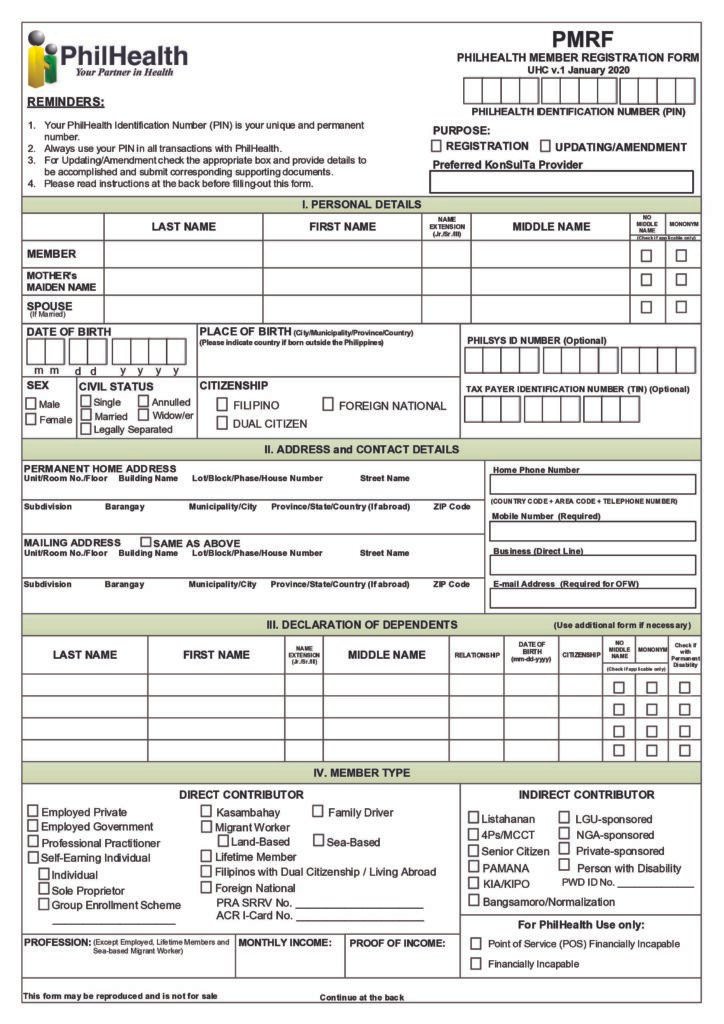
The PhilHealth PMRF (UHC v.1, January 2020) has six main sections. Here’s what to enter in each one.
Purpose of Application
Tick one: REGISTRATION (first-time), UPDATING/AMENDMENT (changes to existing records), or your Preferred KonSulTa Provider. The reminders box notes that your PIN is unique and permanent — always use it in PhilHealth transactions.
I. Personal Details
Full name (Last, First, extension like Jr./Sr./III, Middle — or tick the mononym box if you have one name), mother’s maiden name, spouse’s name if married, date of birth (mm-dd-yyyy), place of birth, PhilSys ID number (optional), sex, civil status, citizenship, and TIN (optional).
II. Address and Contact Details
Permanent home address in full, home phone, mobile number (required), mailing address (or tick “SAME AS ABOVE”), business line, and email address (required for OFWs).
III. Declaration of Dependents
One row per dependent (use an additional form if needed): name, date of birth, relationship, citizenship, and a “with Permanent Disability” checkbox.
IV. Member Type
Tick one category. Direct contributors: Employed Private, Employed Government, Professional Practitioner, Self-Earning Individual, Sole Proprietor, Kasambahay, Family Driver, Migrant Worker (land-based / sea-based), Filipinos with Dual Citizenship / Living Abroad, Foreign National, Group Enrollment Scheme. Indirect contributors: Listahanan, 4Ps/MCCT, Senior Citizen, Lifetime Member, PAMANA, KIA/KIPO, Person with Disability, LGU-sponsored, NGA-sponsored, Private-sponsored, Bangsamoro/Normalization, Point of Service (POS) – Financially Incapable. The form also has PRA SRRV No. and ACR I-Card No. fields for foreign nationals and retirees.
V. Updating/Amendment
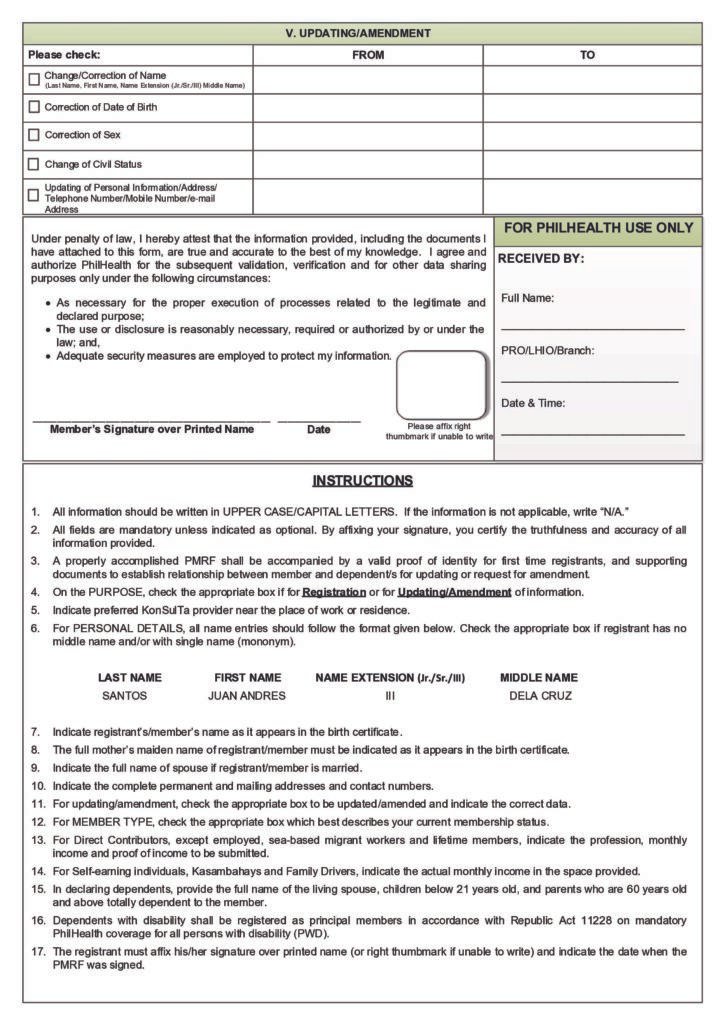
Only for changes: fill the FROM and TO columns for the item being changed — name, date of birth, sex, civil status, personal information, address, telephone, mobile, or email. Attach the supporting document for each change (see the documents section below).
Signature block
Sign over your printed name, date it, and — if you are unable to write — affix your right thumbmark. This is the attestation “under penalty of law” described above.
Try Also: PhilHealth Senior Citizen
Where to Submit the PMRF
There are five ways to submit your PMRF form. Choose the option that best fits your situation and membership needs.
PhilHealth Update Form: Changing Your Records
There is no separate “update form” — updating is done with the same PMRF. Tick UPDATING/AMENDMENT as the purpose, fill Section V’s FROM and TO columns with the old and new details, and attach the supporting document for each change.
Common updates and the documents typically required:
Submit updates the same ways as registration: any LHIO walk-in, the Member Portal where available, or email. Changes typically reflect in your records within a few working days.
Read Also: CSF Form PhilHealth
Supporting Documents You Need
The official minimum (Circular 2020-0001): at least one valid proof of identity for first-time registrants, plus documents establishing the member-dependent relationship when declaring dependents. The Member Portal’s official per-scenario requirements:
Your situation | What to attach |
|---|---|
Single Filipino | Birth certificate |
Married | Marriage contract |
Foreign national | ACR I-Card or passport (use the PMRF-FN form) |
No middle name | Birth certificate |
College student | Validated Certificate of Matriculation |
For walk-in submissions, LHIOs commonly ask for: two copies of the PMRF, two 1×1 ID photos, and a photocopy of your birth certificate or two valid IDs — bring the originals for verification.
Proof of income: required for Direct Contributors except formally employed members, sea-based OFWs, and lifetime members. As noted above, Kasambahays, Family Drivers, and self-earning individuals can simply declare their income on the signed PMRF.
Member Types: Who Registers How
PhilHealth has two broad categories, and the registration route differs:
Member type | How to register |
|---|---|
Employed (private / government) | Your employer files the ER1 plus a PMRF per employee. |
Self-earning, professionals, Kasambahay, family drivers, OFWs | Self-register: walk in at any LHIO, apply online, or email — PMRF + valid ID + declared income. |
Senior citizens (60+, Filipino residents) | Register through your city’s OSCA, or directly. Covered automatically under RA 10645. |
Indigent / sponsored (LGU, NGA, 4Ps/Listahanan, PAMANA) | Enrolled through the sponsoring agency, LGU, or DSWD. |
Foreign nationals | Use the PMRF-FN form + ACR I-Card or passport. |
What Is the ePMRF?
You may see the term ePMRF and assume it is an online form you can fill out yourself. It is not. The ePMRF is PhilHealth’s electronic member registration system — a portal built by DBP-Data Center, Inc. used in LGU-led mass enrollment drives, where registration data is captured electronically for validation, data mapping, and PIN generation.
For individuals, the electronic route is the Member Portal — the Electronic Registration System — where you upload your duly accomplished PMRF and supporting documents. Do not look for a downloadable “ePMRF form”; it does not exist for individual applicants.
Read Also: PhilHealth online payment
FAQs
What is the latest PMRF version?
UHC v.1 January 2020. No newer revision has been found as of October 2026. If a “new” PMRF is offered anywhere else, verify it against the official downloads page.
What does “duly accomplished” mean?
A completely filled-out PMRF (in UPPER CASE, “N.A.” where not applicable), signed under penalty of law, submitted with at least one valid ID — plus supporting documents for dependents or amendments.
Can I fill out and submit the PMRF online?
Yes, through the Member Portal’s Electronic Registration System, where you upload your duly accomplished PMRF and supporting documents. Processing takes 3–5 working days and your PIN is emailed to you.
How do I update my PhilHealth information?
Use the same PMRF: tick UPDATING/AMENDMENT, fill Section V’s FROM/TO columns, and attach supporting documents (e.g., marriage certificate for civil-status change, birth certificate for corrections).
What ID do I need to register?
At least one valid proof of identity for first-time registrants — e.g., birth certificate, passport, driver’s license, or other government-issued ID. The Member Portal lists per-scenario requirements (single: birth certificate; married: marriage contract; foreign national: ACR I-Card/passport).
How long does PhilHealth registration take?
Online applications are processed within 3–5 working days. Walk-in processing at LHIOs depends on the office queue.
Is there a fee for the PMRF or registration?
No, the form is free and marked “not for sale.” Contribution payments are separate from registration.
Where do I submit the PMRF?
Any LHIO or PhilHealth Express outlet nationwide, the Member Portal online, by email to actioncenter@philhealth.gov.ph, through your employer (if formally employed), or through your city’s OSCA (if a senior citizen).
What if I made a mistake on my PMRF?
File an update: tick UPDATING/AMENDMENT, correct it in Section V (FROM/TO), and attach the supporting document. Never register twice to “fix” an error — your PIN is unique and permanent.